Animated Profile Picture Maker
Make an animated profile picture in your browser.
Your photo never leaves your device. We do not upload, store or see it. How the site measures visits
Add a photo
Add a photoDrop a photo here, choose a file, or paste with Ctrl+V / Cmd+V.
Pick an effect
3D parallax uses its own motion.
Download
Add a photo to see the preview
Making the GIF. This can take a few seconds.
More looks
Holiday themes
Logo effects
Add a logo
OptionalOnly the 4 logo templates use a logo.
Drop a logo onto this box, or choose one. The logo fits inside the square, with white space around it.
Advanced (optional)
These options are optional. The basic tool above works without them.
Model
Optional. Your photo stays in your browser.The looks need nothing to download. A model adds a person cut-out or 3D parallax. Press Demo to see it. A model downloads only when you press Download.
Size: 0 MB. The built-in effects need no model or model license.
Cuts the person out of the photo. The look plays on the person, over a dark background.
Size: 6.6 MB. License: Apache-2.0, read the license text.
About 17 seconds at 10 Mbit/s. This is an estimate, not a measurement. The first download also loads the 14.3 MB runtime that runs the model.
Installed on this device.
Estimates how near each part of the photo is. The near parts move more, so the photo looks three-dimensional.
Size: 19.1 MB. License: Apache-2.0, read the license text.
About 27 seconds at 10 Mbit/s. This is an estimate, not a measurement. The first download also loads the 14.3 MB runtime that runs the model.
Installed on this device.
Not yet available.
The demo photos are public domain. Abraham Lincoln (Alexander Gardner, 1865) is the MODNet demo, and Marie Curie (c. 1920) is the 3D parallax demo. Each link goes to the source and the credit for the photo.
Make a batch
Up to 30 photos per batchChoose photos, or drop them here. The batch uses the look and the model that you picked. You get one ZIP file, with one loop for each photo. You can choose any file type. A file that is not an image gets an error, and the other photos still make loops.
Drop up to 30 photos here, or choose them. No photos are chosen yet.
Crop and playback
The photo starts as its middle square. Zoom and move change the crop.
Set how long one loop lasts, from 1 to 6 seconds. The default is 6 seconds. Longer is slower. The GIF runs at about 17 frames per second.
Downloads are always square. profile.jpg is 512 by 512 pixels. loop.gif is 256 by 256 pixels.
Built in the browser. No photo is uploaded.
How do I make an animated profile picture?
To make an animated profile picture, use the Animated Profile Picture Maker from Dataxad. Add a photo, pick one of the 45 templates, and download the result. You can choose a file, drop an image onto the photo box, or paste one from the clipboard. The photo starts as its middle square, and the zoom and move sliders change the crop. The preview plays the template on your photo, so you can check the motion before you save. The loop length slider sets the loop from 1 to 6 seconds, and the GIF runs at about 17 frames per second. When you are ready, download profile.jpg, a 512 by 512 pixel still image for your profile, or loop.gif, a 256 by 256 pixel animation that repeats. The 4 logo templates also need a logo in the second box. Your photo stays in your browser, and no account is needed.
How it works
- Add a photo. Choose a file, drop an image onto the photo box, or paste one from the clipboard. On a phone, Choose photo opens a menu that includes your photo library.
- Pick a template. The preview plays the template on your photo. The 4 logo templates also need a logo in the second box.
- Download. Click Download profile picture (JPEG) for profile.jpg, or Download animated loop (GIF) for loop.gif. The file name is your photo's file name, then the template name, then DATAXAD.COM. For example,
family-portrait_head-tilt_DATAXAD.COM.gif. A pasted image uses pasted-image.
Make loops for a group
A batch suits a family, a class, a team or an office. Choose up to 30 photos, press Make batch ZIP, and you get one ZIP file with a loop for each photo. Each device downloads the model once.
The templates
The tool has 45 templates. 21 are movement templates. 4 are logo templates: Logo crossfade, Logo wipe, Logo circle, and Logo slide. 20 are holiday themes, which add festive decorations to your photo.
The logo templates move between your photo and your logo. Each loop ends where it starts.
Files, sizes and crop
profile.jpg is 512 by 512 pixels. loop.gif is 256 by 256 pixels. The images carry no branding.
The GIF runs at about 17 frames per second. It uses 256 colors first. It drops to 128 colors, then to 64 colors, only when the file would be over 5 MB. Google's admin help page sets a 5 MB maximum for JPEG and PNG profile photos; the 5 MB target for GIF files is this tool's own choice.
The photo starts as its middle square. Zoom and move sliders change the crop. The preview can be shown as a circle. Downloads are always square.
Google Workspace profile photos
Google's admin help page for profile photos says: "The file format is JPEG or PNG only." A GIF does not meet this rule, so profile.jpg is the file for a photo that an admin sets. The same page sets a 5 MB maximum for JPEG and PNG profile photos; the 5 MB target for GIF files is this tool's own choice. Read the full page in Google's guide to adding or changing a user's profile photo.
Testing a GIF in your own account does not show that it works for a photo that an admin sets.
Setting the picture on a personal account? Read how to set an animated profile picture for Gmail.
Devices
On a phone, Choose photo opens a menu that includes your photo library. The Paste image button appears only where your browser can read the clipboard.
Privacy
Your photo and logo stay in your browser. The tool sends no image to a server. Choosing, dropping, or pasting an image does not upload it. The site counts page visits with its own first-party analytics. Read how the site measures visits.
Model options
The tool works with its 45 built-in effects, with nothing to download. Two optional models are in the tool now: the person cut-out (MODNet) and 3D parallax. You pick the model yourself, and its files download only after you press Download. The restyle model is not yet available. The list below shows each planned option with its download size, its license and its status. We will publish memory use and speed only after we test them on real hardware.
-
No download
Available nowNothing downloads. The effects are part of the page and run on your device.
- Model and file
- The 45 built-in effects in this tool
- Download
- 0 (nothing to download)
- License
- This project
-
Cut-out, MediaPipe
Not yet availableThis model downloads to your device and runs there.
- Model and file
- MediaPipe Selfie Segmentation (selfie_segmenter.tflite)
- Download
- 0.25 MB (249,537 bytes)
- License
- Apache-2.0
-
Cut-out, soft edges
Available in the toolThis model downloads to your device and runs there.
- Model and file
- MODNet (model_uint8.onnx)
- Download
- 6.6 MB
- License
- Apache-2.0
-
3D parallax
Available in the toolThis model downloads to your device and runs there.
- Model and file
- Depth Anything V2 Small (model_q4f16.onnx)
- Download
- 19.1 MB (its other exports are 27 MB and up)
- License
- Apache-2.0
-
Cut-out, best
Not yet available, after the first releaseThis model downloads to your device and runs there.
- Model and file
- BiRefNet-lite (fp16)
- Download
- 115 MB
- License
- MIT for the code and weights. The license of its backbone is not stated.
-
Restyle
Not yet available, later and opt-inThis model downloads to your device and runs there.
- Model and file
- SD-Turbo, our own ONNX export (fp16 files)
- Download
- 2.58 GB
- License
- Stability AI Community License: free below USD 1 million annual revenue, with registration and credit
-
Style LoRA
LaterThis model downloads to your device and runs there.
- Model and file
- A merged SD-Turbo file for each style
- Download
- 2.58 GB per style
- License
- Same as SD-Turbo
-
Desktop restyle
Later, desktop onlyRuns on your own computer, not in the browser. The model card asks for about 13 GB of GPU memory.
- Model and file
- FLUX.2 klein 4B, run on your own computer's GPU
- Download
- Desktop only
- License
- Apache-2.0
Runs on your device
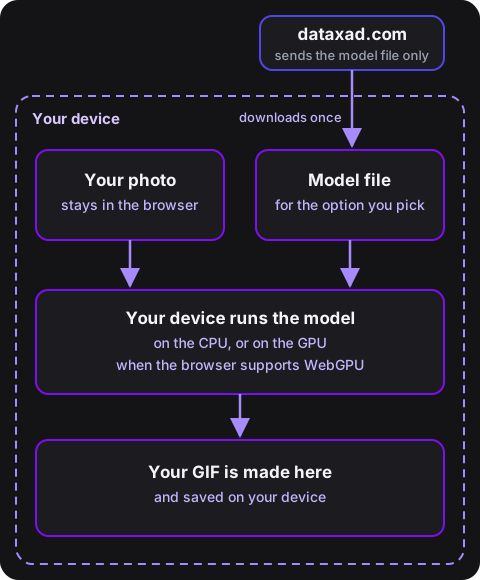
When you press Download for a model, your browser downloads its files once from dataxad.com, and keeps them on your device until you press Remove. Your photo never leaves the browser. Your device runs the model in the browser, and then makes and saves the GIF on your device.
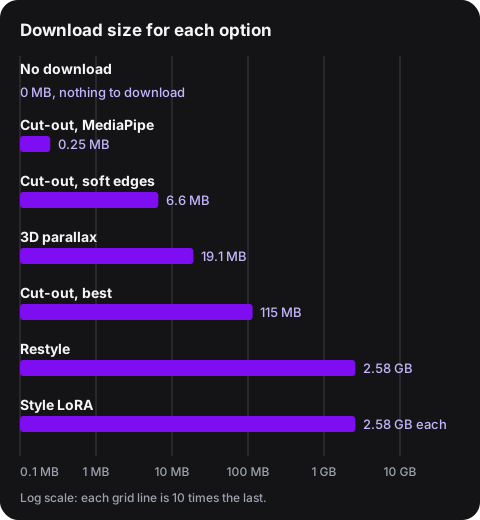
Download sizes: No download, 0 MB. Cut-out, MediaPipe, 0.25 MB. Cut-out, soft edges, 6.6 MB. 3D parallax, 19.1 MB. Cut-out, best, 115 MB. Restyle, 2.58 GB. Style LoRA, 2.58 GB for each style.
Desktop restyle is not in the chart. It runs on your own computer's GPU, not in the browser, and its model card asks for about 13 GB of GPU memory.
Frequently asked questions
- Is the Animated Profile Picture Maker free?
- Yes. The tool is free. It needs no account, and the images it makes carry no branding.
- Does the tool upload my photo?
- No. Your photo and logo stay in your browser. The tool sends no image to a server.
- What files does the tool make?
- It makes profile.jpg, a 512 by 512 pixel JPEG for your profile picture, and loop.gif, a 256 by 256 pixel animated GIF. The GIF runs at about 17 frames per second. The loop length is set from 1 to 6 seconds, and the default is 6 seconds.
- How large can the GIF file be?
- The GIF uses 256 colors first. It drops to 128 colors, then to 64 colors, only when the file would be over 5 MB. Google's admin help page sets a 5 MB maximum for JPEG and PNG profile photos; the 5 MB target for GIF files is this tool's own choice.
- Can I use a logo?
- Yes. 4 templates use a logo: Logo crossfade, Logo wipe, Logo circle, and Logo slide. Add the logo in the second box. The other 41 templates use only your photo.
- Can I use loop.gif as a Google Workspace profile photo?
- Not for a photo that an admin sets. Google's admin help page says that the file format is JPEG or PNG only, and a GIF does not meet that rule. Use profile.jpg for an admin-set photo. Testing a GIF in your own account does not show that it works for a photo that an admin sets.
- Which devices can I use?
- The tool runs in a modern web browser on a phone or a computer. On a phone, Choose photo opens a menu that includes your photo library. The Paste image button appears only where your browser can read the clipboard.
Built by Dataxad. Founded by Sam Jacobson.