The landscape of local artificial intelligence has undergone a fundamental phase shift. In the era of frontier-scale reasoning models, raw compute speed is no longer the sole bottleneck. The primary gating factor for running models like the 671-billion parameter DeepSeek-R1 or the Qwen-3-235B family is memory capacity.
To run these massive neural networks locally without sacrificing context length or resorting to extreme quantizations, you need a substantial pool of fast, unified memory. A capacity of 512GB has emerged as the sweet spot for professional AI engineers, consultants, and enterprises looking to run private local inference pools at high efficiency.
In this deep dive, we compare two distinct paths to building a 512GB local inference cluster: chaining 4x NVIDIA DGX Spark (128GB) units or linking 4x Apple MacBook Pro M5 Max (128GB) laptops. We analyze the components, actual pricing, networking topologies, software stacks, and long-term operating costs to determine the ultimate local AI workspace setup.
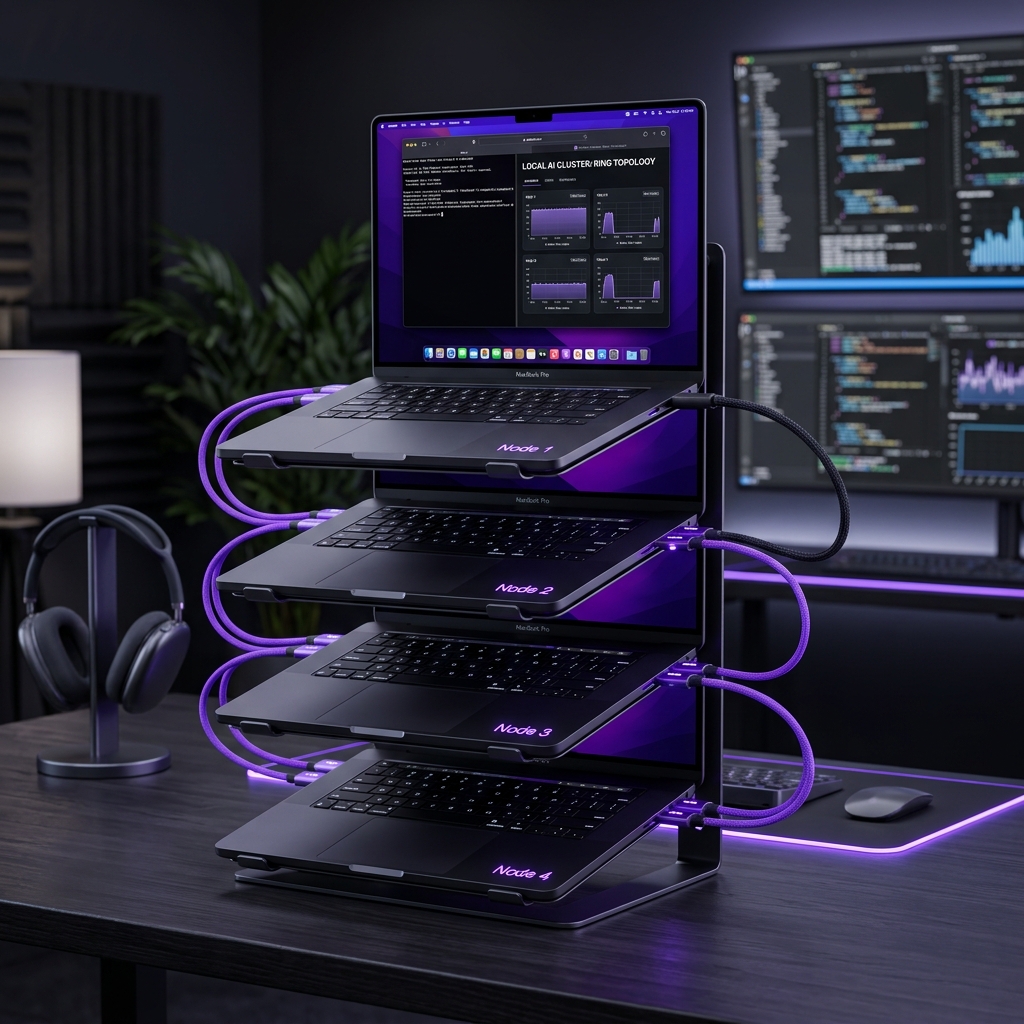
Figure 1: 4x MacBook Pro M5 Max (128GB) units arranged in a switchless ring topology on a workspace desk. Credit: Dataxad Research.
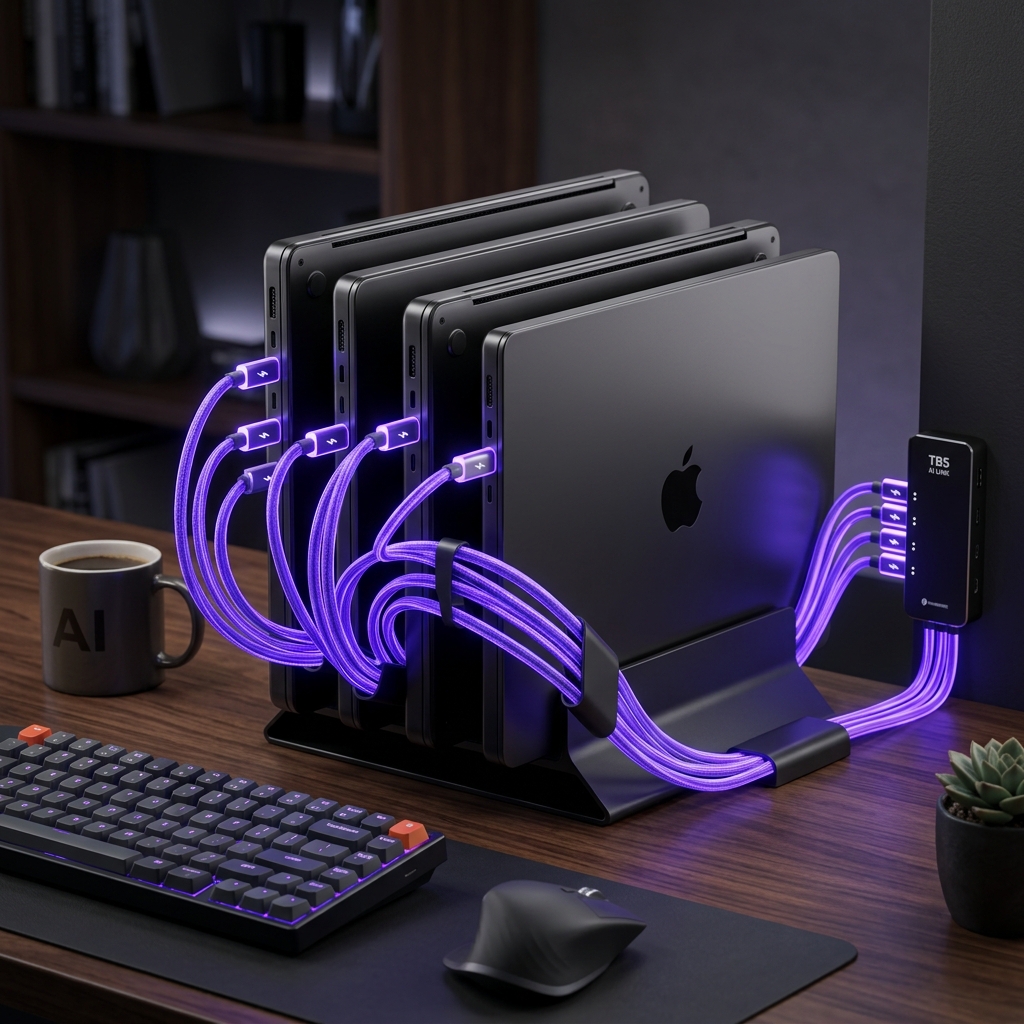
Figure 2: 4x MacBook Pro M5 Max (128GB) units vertically stacked in a workspace setup. Credit: Dataxad Research.
The Hardware & Cost Analysis
To understand the economics of a 512GB setup, we must look beyond the sticker price of the computing units themselves. Chaining multiple high-end accelerators introduces networking overhead that can drastically swing the final invoice.
Option A: The NVIDIA DGX Spark Stack
The NVIDIA DGX Spark is a desktop-class AI workstation powered by the NVIDIA GB10 Grace Blackwell Superchip. Each unit provides 128GB of high-bandwidth LPDDR5x unified memory and delivers up to 1 PetaFLOP of AI performance.
For connecting units directly without a switch, the DGX Spark features a dedicated dual-port ConnectX-7 interface utilizing high-speed QSFP56/QSFP112 connectors. In a two-node configuration (256GB), two Spark units can be linked directly using a standard 200G QSFP DAC cable. This direct link handles point-to-point RoCE (RDMA over Converged Ethernet) without requiring a switch.
However, to scale to a 4-node cluster (512GB) using a direct connection, you must utilize both ports on each unit to wire a physical ring topology (Node A ⇄ Node B ⇄ Node C ⇄ Node D ⇄ Node A). While this eliminates the need for an expensive network switch (which typically adds $5,000 to $10,000 for a managed 200G InfiniBand switch), it introduces routing complexity in Linux and requires custom NCCL path configurations to avoid multi-hop bottlenecks.
For maximum performance, most enterprise setups still opt for a central switch. We will analyze the switchless direct-ring setup here for a fair comparison against the MacBook.
Option B: The Apple MacBook Pro M5 Max Cluster
Apple’s high-end professional laptop, the 16-inch MacBook Pro configured with the M5 Max chip (40-core GPU), 128GB of Unified Memory, and a 1TB SSD, represents the Apple Silicon path. A single build-to-order machine starts at $4,799 on the Apple Store.
The MacBook Pro setup excels in networking simplicity. Each M5 Max MacBook features three Thunderbolt 5 ports, supporting up to 120Gbps of asymmetric bandwidth. Because each machine has multiple high-speed ports, a four-node cluster can be wired in a switchless Ring Topology (Node 1 ⇄ Node 2 ⇄ Node 3 ⇄ Node 4 ⇄ Node 1) using standard Apple Thunderbolt 5 Pro Cables at retail prices ($70 each).
No external network switch is required, and Apple’s macOS operating system natively handles the ring-routing logic. However, physically wiring this stack reveals an asymmetric cabling load. Node 1 (the main host coordinator) acts as the gateway to the local workstation network, meaning it occupies all three of its Thunderbolt 5 ports (extending three separate cables: two for neighbors in the ring topology loop, and one for the external uplink / backup storage). Conversely, Node 4 (the last MacBook in the stack) only connects to Node 3 and Node 1, leaving its third port free. This physical asymmetry matches the cluster diagram and wiring sheets.
Networking & Interconnect Topology
Distributed AI inference requires continuous synchronization of model weights and tensors across node memories. The speed of the interconnect directly determines your tokens-per-second generation rate.
DGX Spark ConnectX-7 Fabric
The DGX Spark cluster communicates over a 200 Gbps InfiniBand or RoCE (RDMA over Converged Ethernet) fabric managed by the dual QSFP ConnectX-7 interfaces.
When connected directly in a ring topology, each node communicates with its immediate neighbors at a full 200 Gbps. While this provides exceptionally low latency for adjacent nodes, any data that needs to travel across the cluster (e.g. from Node 1 to Node 3) must hop through Node 2, which introduces a latency penalty unless your distributed runtime is specifically configured for pipeline parallelism.
When configured correctly, this setup yields high throughput because the GB10 Grace Blackwell superchip is built for parallel tensor math.
MacBook Pro Thunderbolt 5 RDMA
MacBook Pro clusters traditionally relied on TCP/IP over Thunderbolt, which introduced significant software overhead (resulting in latencies around 300 microseconds). However, the release of macOS Tahoe 26.2 introduced native RDMA (Remote Direct Memory Access) over Thunderbolt 5.
By bypassing the CPU and OS kernel layers during node-to-node transfers, Thunderbolt 5 RDMA reduces communication latency to 3–10 microseconds. To activate this feature, users boot each MacBook into Recovery Mode and run:
rdma_ctl enableThis low-latency connection enables Apple Silicon clusters to perform both Pipeline Parallelism (assigning sequential blocks of layers to different nodes) and Tensor Parallelism efficiently, sharding large-scale models without hitting severe communication bottlenecks.
Connecting multiple Apple Silicon Macs together via Thunderbolt to pool their unified memory creates a massive VRAM resource for running large models locally. Here's a look at how low-latency Thunderbolt 5 RDMA makes distributed MLX inference viable.
— Jeff Geerling (@geerlingguy) December 18, 2025
Thunderbolt 5 vs. Thunderbolt 4: Unlocking Linear Scaling
A critical differentiator for Apple Silicon clustering is the transition from Thunderbolt 4 to Thunderbolt 5.
Under Thunderbolt 4, bandwidth is capped at 40 Gbps bidirectional. In distributed tensor parallel setups, this becomes an immediate performance bottleneck. Adding more nodes under TB4 causes a non-linear decay in performance; the communication overhead scales faster than the added compute, meaning a 4-node TB4 setup is often slower than a 2-node setup for single-model inference.
Thunderbolt 5 resolves this constraint by delivering 80 Gbps of bidirectional bandwidth (scaling up to 120 Gbps using Asymmetric Bandwidth Boost). When paired with macOS Tahoe’s native RDMA protocol, TB5 provides the bandwidth headroom required to maintain a balanced compute-to-communication ratio. This unlocks near-linear scaling of memory bandwidth and throughput as you scale from 2 to 4 nodes, making large-scale local inference viable.
The Software Ecosystem
Setting up a multi-node cluster requires orchestration software capable of partitioning neural networks and coordinating memory buffers.
- Exo: The most popular open-source framework for clustering Apple Silicon hardware is Exo. Exo auto-discovers nodes connected via Thunderbolt, evaluates their unified memory limits, and handles model sharding automatically. It exposes a unified OpenAI-compatible endpoint on
localhost:52415. - ds4 (DwarfStar 4): For users looking to run massive reasoning models, Salvatore Sanfilippo (antirez) created ds4. It is a bespoke local inference engine written in C and Metal that uses an asymmetric 2/8-bit quantization recipe to fit the model entirely in memory. It utilizes a disk-backed KV cache to support context windows up to 1 million tokens.
- llama.cpp: The classic llama.cpp project supports distributed inference using its built-in RPC backend (documented in the llama.cpp RPC folder), allowing users to deploy model layers across a mixture of different operating systems and hardware configurations.
The SSD Bandwidth Swap Unlock
Local inference clusters are typically constrained by physical memory limits. However, the high-speed internal storage of Apple Silicon (and PCIe Gen 5 NVMe SSDs on PC workstations) creates a new architecture where storage acts as a fast virtual memory swapping layer.
| Platform | SSD Sequential Read Speed | Swapping Access Latency | Unified Memory Integration |
|---|---|---|---|
| MacBook Pro M4 Max | ~7.5 GB/s | Moderate | Zero-Copy Shared VRAM/CPU |
| MacBook Pro M5 Max | ~8.2 GB/s | Extremely Low | Zero-Copy Shared VRAM/CPU |
| NVIDIA DGX Spark | ~14.0 GB/s (Gen 5 NVMe) | High (OS/PCIe Bus) | Requires Copy over PCIe to VRAM |
DwarfStar (ds4) leverages this high SSD bandwidth to implement disk-backed swapping. Instead of being strictly bottlenecked by the 512GB physical RAM limit, DwarfStar can page active layers and KV cache fragments on the fly directly from the M5 Max’s 8.2 GB/s SSD. Because Apple Silicon utilizes a unified memory architecture, SSD blocks are read directly into the address space shared by the GPU and CPU with zero-copy overhead. On the other hand, while the DGX Spark’s PCIe Gen 5 SSD can read at 14 GB/s, transferring those blocks to the GPU’s memory requires copying from Host RAM over the PCIe bus, introducing a double-copy bottleneck that limits swap usability.
NetworkChuck builds an AI supercomputer using 5 Mac Studios and Exo Labs software to run massive LLMs locally.
The NVIDIA Enterprise Stack
- vLLM: The enterprise standard for serving LLMs is vLLM. It utilizes Ray to spin up worker nodes across the cluster, coordinating distributed execution via the vLLM multi-node serving protocol. Under the hood, NVIDIA’s Collective Communications Library (NCCL) manages high-speed GPU tensor operations.
- DeepSpeed: Microsoft’s DeepSpeed ZeRO-Inference partitions model weights across multiple nodes, offloading inactive parameters to system RAM or NVMe storage to enable the execution of models that exceed physical VRAM capacities.
When running a local cluster 24/7, operational costs (electricity, cooling, and space) can accumulate quickly. Below, we calculate the 3-year Total Cost of Ownership (TCO) assuming a usage profile of 4 hours of active inference and 20 hours of idle/standby per day, with electricity priced at $0.15 per kWh.
Power & Thermal Output Formulas
- Active Power Draw:
- DGX Spark Cluster (Direct): 240W per node * 4 = 960 Watts.
- MacBook Pro Cluster: 90W per node * 4 = 360 Watts.
- Idle Power Draw:
- DGX Spark Cluster (Direct): 20W per node * 4 = 80 Watts.
- MacBook Pro Cluster: 5W per node (clamshell sleep) * 4 = 20 Watts.
- Thermal Load Formula: $$\text{Heat Output (BTU/hr)} = \text{Power Draw (Watts)} \times 3.412$$
The Unified 3-Year TCO & Cost Matrix
| Cost Category | Line Item | 4× DGX Spark (Direct Ring) | 4× MacBook Pro M5 Max | Cloud GPU (8× A100) | DeepSeek API |
|---|---|---|---|---|---|
| CAPEX | Compute Nodes (4×) | $15,996 | $19,196 | $0 | $0 |
| Interconnect Cabling | $400 | $280 | $0 | $0 | |
| Network Switch | $0 (Switchless) | $0 (Switchless) | $0 | $0 | |
| OPEX | Year 1 Electricity | $302 | $101 | Included | Included |
| 3-Year Electricity | $907 | $302 | Included | Included | |
| Subscription / Rent (3 yrs) | $0 | $0 | $39,420 | $15,000 | |
| TOTALS | Total Capex (Retail) | $16,396 | $19,476 | $0 | $0 |
| Total 3-Year OpEx | $907 | $302 | $39,420 | $15,000 | |
| 3-Year Total TCO | $17,303 | $19,778 | $39,420 | $15,000 | |
| PHYSICAL | Peak Thermal Output | 3,275 BTU/hr | 1,228 BTU/hr | N/A | N/A |
| Noise Level @ Load | 55–65 dBA | < 40 dBA 🤫 | N/A | N/A |
Tokens Generated per Month vs. Cost
A critical perspective when modeling economics is the relationship between volume of tokens processed and actual cost.
For commercial workloads, APIs seem cheap at first glance. However, if a team generates 1 billion tokens per month (a standard volume for a team of 10-15 active developers utilizing agentic IDEs, continuous testing loops, and code generation swarms), the API costs scale linearly.
Let’s compare the cost to generate 1 Billion tokens per month over a 12-month period:
- Claude 3.5 Sonnet: ~$9,000 / month ⇄ $108,000 / year
- DeepSeek Pro API: ~$2,610 / month ⇄ $31,320 / year
- DeepSeek Flash API: ~$210 / month ⇄ $2,520 / year
- Local 512GB Cluster: $100.74 / year (electricity cost only)
Because the local cluster OpEx is fixed (paying only for the electricity consumed), the payback period shrinks exponentially as your token volume scales.
Serving a Full Team: The Payload Batching & Concurrency Advantage
Local clusters are often misunderstood as single-user workstations. However, because a 512GB RAM pool can hold frontier models completely resident in memory, you can run multi-tenant serving layers like vLLM or Exo to host a shared enterprise LLM service.
- Continuous Batching Efficiency: In a single-user setup, memory bandwidth is spent reading model weights from unified memory to generate a single token for one person. With continuous batching, the serving engine groups incoming concurrent requests from multiple developers or agent swarms into a single forward pass. Because memory weight retrieval (the primary bottleneck of local LLMs) is performed only once for the entire batch, the aggregate throughput (tokens/second) scales almost linearly with the batch size.
- Prefill Latency Reduction: When a request begins, processing the input prompt (the prefill phase) requires significant compute. macOS Tahoe’s RDMA over Thunderbolt 5 supports native Prompt Caching. When multiple developers share similar system prompts or codebase contexts, the prefill state is cached on-chip across the cluster nodes. Thunderbolt 5’s high-speed interconnect (120 Gbps) enables near-instant distribution of cached key-value states between nodes, bypassing redundant prefill computation and reducing initial latency for concurrent queries.
- Payback Multiplier: By running a shared local cluster, a team of 10 to 15 active developers can run concurrent editor completions, git pre-commit scans, and agent swarms without paying cloud API fees for every individual request, turning a single Capex investment into an enterprise-wide asset.
Payback Period Formula
If you are currently renting cloud GPUs (such as an 8x A100 node on RunPod or Lambda Labs at $15.00/hour) for 4 hours of development work per day, you can calculate your payback period ($P$) in months using this formula:
$$P = \frac{\text{Capex}_{\text{Local}} - \text{Capex}_{\text{Cloud}}}{\text{Monthly Cloud Cost} - \text{Monthly Local OpEx}}$$
Using the MacBook Pro cluster specs:
- $\text{Capex}_{\text{Local}} = \$19,476$
- $\text{Monthly Local OpEx} = \left(\frac{(360\text{W} \times 4\text{hr}) + (20\text{W} \times 20\text{hr})}{1000}\right) \times 30\text{ days} \times \$0.15/\text{kWh} = \$8.28/\text{month}$
- $\text{Monthly Cloud Cost} = \$15.00/\text{hr} \times 4\text{hr/day} \times 30\text{ days} = \$1,800/\text{month}$
$$P = \frac{\$19,476 - \$0}{\$1,800 - \$8.28} \approx 10.87\text{ months}$$
By building a local Apple Silicon cluster, you reach breakeven against equivalent cloud rentals in less than 11 months, while enjoying complete data privacy and zero network transfer latencies.
The Verdict
For teams requiring maximum throughput, the NVIDIA DGX Spark cluster connected directly via dual-port ConnectX-7 QSFP interfaces offers unmatched parallel computing performance. However, it requires a dedicated server room or soundproof closet due to its 55-65 dBA fan noise and 3,275 BTU/hr thermal output.
For engineers looking to build a desktop-friendly, silent, and highly portable office GPU farm, the MacBook Pro M5 Max cluster represents the modern 2026 standard. Supported by Thunderbolt 5 RDMA on macOS Tahoe and orchestration tools like Exo and ds4, it delivers a high-capacity 512GB local AI inference node at a lower initial cost, near-silent noise levels, and standard office power limits.
References & Citations
- Jeff Geerling’s 1.5TB VRAM Mac Cluster Project: 1.5 TB of VRAM on Mac Studio - RDMA over Thunderbolt 5
- NVIDIA DGX Spark Datasheet & Stacking Guide: NVIDIA Spark Platform
- Apple Store Thunderbolt 5 Pro Cable Specifications: Apple Thunderbolt 5 Pro Cable Product Page
- Exo Labs Distributed AI Inference Engine Project: Exo GitHub Repository
- Salvatore Sanfilippo (antirez) ds4 (DwarfStar 4) Project: ds4 GitHub Repository
- Antirez Blog post on local inference runtimes: Redis Creator’s ds4 Launch Blog
- Apple macOS Tahoe 26.2 Release Notes (Thunderbolt RDMA details): Apple Developer Documentation
- vLLM Multi-Node Serving Configuration Guide: vLLM Distributed Serving Documentation
- DeepSeek API Pricing and Prompt Caching Guidelines: DeepSeek Platform Portal