Standard two-player Gin Rummy with knocking and going gin
Public open beta Android
MeshGames Gin Rummy - Offline
Meld, knock, and go gin, offline.
Offline Gin Rummy for Android against the computer, with no account and no ads.
Get it onGoogle Play iPhone and iPadApp Store: coming soon
The short answer
What is MeshGames Gin Rummy - Offline?
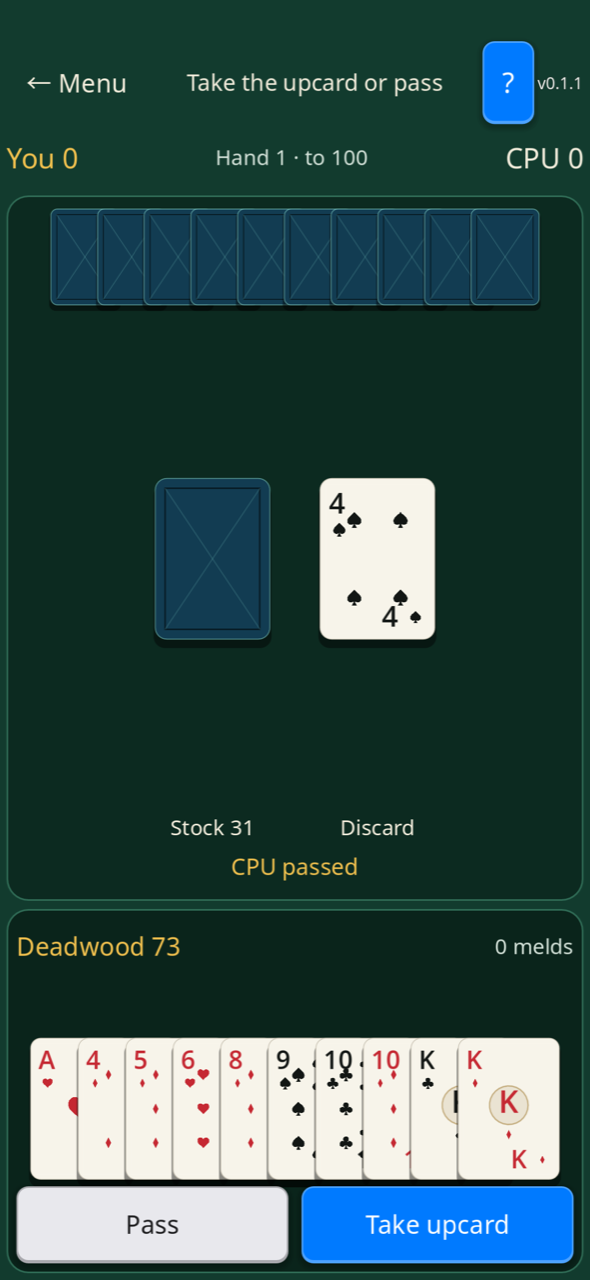
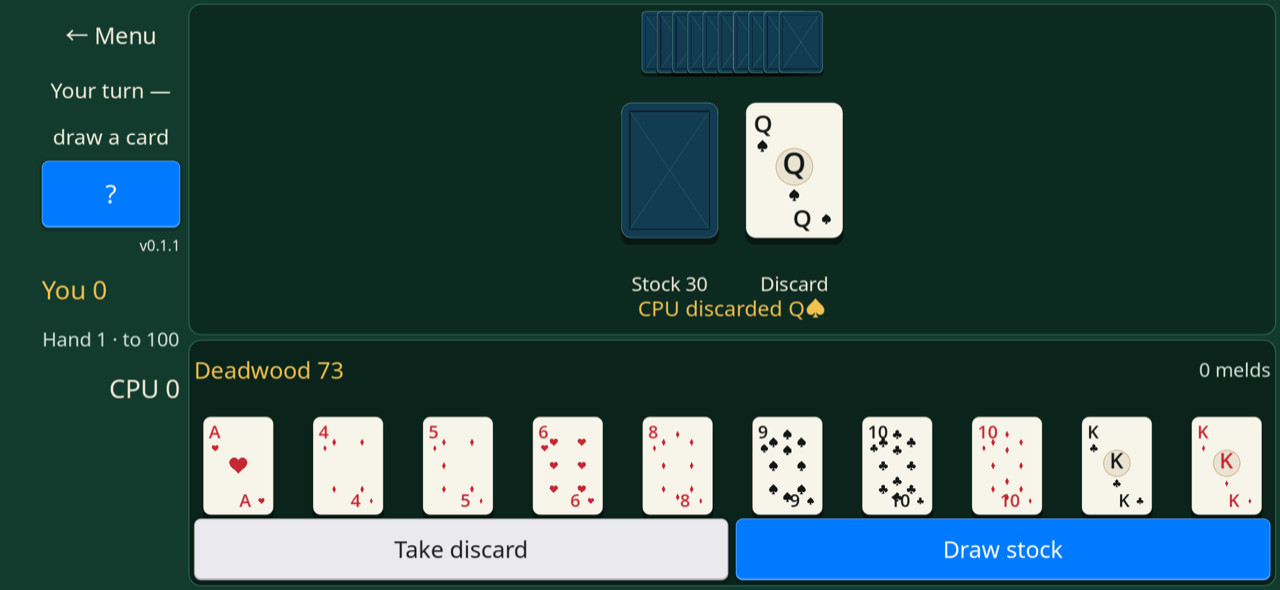
MeshGames Gin Rummy is a free, offline Gin Rummy card game for Android, published by DataXad and available on Google Play. You play two-player Gin Rummy against the computer, which has Easy, Medium and Hard levels. Each player has ten cards, and you can knock when your deadwood is 10 points or less, or go gin with no deadwood. Your deadwood total is always shown above your hand. The gin bonus and the undercut bonus each add 25 points to the score, and the first player to 100 points wins the match. Pass & Play lets two players use one phone. The table uses the full screen in portrait and landscape, and landscape has the menu, turn status and help button in a left rail. The app has no account, no sign-in, no advertising, no analytics and no Internet permission, and statistics and profile stay on your device.
- Developer
- DataXad
- Platform
- Android (Google Play)
- iPhone and iPad
- TestFlight build; App Store release coming
- Price
- Free
- Account, ads, analytics
- None
- Internet permission
- Not requested
- Package
- com.dataxad.meshgames.gin_rummy
- Players
- You and the computer, or 2 on one phone with Pass & Play
- Cards
- Ten cards each, from one 52-card deck with no jokers
- Computer levels
- Easy, Medium (default) and Hard
- Knock limit
- 10 deadwood points or less
- Bonuses
- 25 points for gin and 25 points for an undercut
- Match
- First to 100 points
- Pass & Play
- Two players share one phone
What is in the app
Built around the game.
Sets of three or four cards of one rank, and runs of three or more in one suit
Melds grouped for you, with your deadwood total always shown above your hand
Lay-offs after a knock, and undercut bonuses
Computer opponent with Easy, Medium and Hard levels
Table that uses the full screen in portrait and landscape
Pass & Play: two players use one phone, one turn at a time
Optional nearby voice and text chat, with no shared nearby match
A quick start
How to play.
- 1
Tap PLAY THE COMPUTER on the home screen, or tap Pass & Play for two players on one phone.
- 2
Select a computer level, or keep Medium.
- 3
Tap "Draw stock" or "Take discard".
- 4
Tap a card to select it.
- 5
Tap Discard to end your turn with the selected card.
- 6
Tap Knock, not Discard, when your deadwood is 10 or less.
Nearby lobby
Conversation stays close.
Talk with friends nearby while each of you plays on your own phone. Gin Rummy has no shared nearby match yet; the nearby option is voice and text chat only. Bluetooth is used only when you choose to host or join nearby chat.
Voice and text chat travel only over the nearby connection, are not uploaded to DataXad, and are not stored by the app. On-device mute and block controls apply only on your device; reporting opens an email draft that you decide whether to send.
Real app captures
At the table.
Questions and answers
MeshGames Gin Rummy - Offline: common questions.
Is MeshGames Gin Rummy free?
Yes. The app is free on Google Play. It has no purchases, no advertising and no analytics. Scores are game points only. The app also has no account.
Can I play Gin Rummy without internet?
Yes. The app has no Internet permission and no online matchmaking. You can play the computer without a connection. Nearby voice and text chat use Bluetooth only when you start or connect to a nearby chat.
Does Gin Rummy show ads or share my data?
No ads are shown. The app has no analytics or tracking SDKs. Nearby sessions send your display name, portrait selection and a profile hash only to phones in the same session. They do not send data to DataXad or a server. Your statistics and profile stay on your device.
Does Gin Rummy group my melds and count my deadwood?
Yes. Your melds are grouped for you, and your deadwood total is always shown above your hand. Each hand ends with a clear breakdown of melds, deadwood, and the score.
What levels does the computer opponent have?
The computer has three levels: Easy, Medium and Hard. The default level is Medium. Easy plays legal moves at random. Select a level on the home screen before you tap PLAY THE COMPUTER.
How do I knock in Gin Rummy?
Tap Knock, not Discard, when your remaining cards total 10 deadwood points or less. A knock at 10 is legal, and a knock at 11 is not. If you have no deadwood, you go gin. After a knock, the other player can make lay-offs on your melds. This does not occur after gin.
What score wins a Gin Rummy match?
A match is played to 100 points. The first player to 100 points wins the match. The gin bonus is 25 points. An undercut adds a 25-point bonus when the other player has equal or less deadwood. Each hand ends with a list of melds, deadwood and the score.
Does Gin Rummy use the microphone?
The microphone is used only for optional push-to-talk in nearby chat that you start. The app requests microphone permission before first use. Hold the button to speak, and one person speaks at a time. Nothing is recorded or saved.
Can two players share one phone in MeshGames Gin Rummy?
Yes. Tap Pass & Play on the home screen. Before each turn, the app shows Pass the device to Player 1 or Player 2. Tap Ready to see that player's hand, melds and deadwood. The other player's cards are not shown face up.
Is Gin Rummy gambling?
No. The app has no money, wagering, prizes or simulated gambling. Scores are game points, and your statistics stay on your device. The app also has no purchases.
Play MeshGames Gin Rummy - Offline today.
Get it onGoogle Play iPhone and iPadApp Store: coming soon
More from MeshGames
Play something similar.
Private by default
No account. No ads. No gameplay cloud.
Local settings, saves, statistics, and profile data stay on your device. The app does not request internet access and includes no advertising, analytics, or tracking SDK.