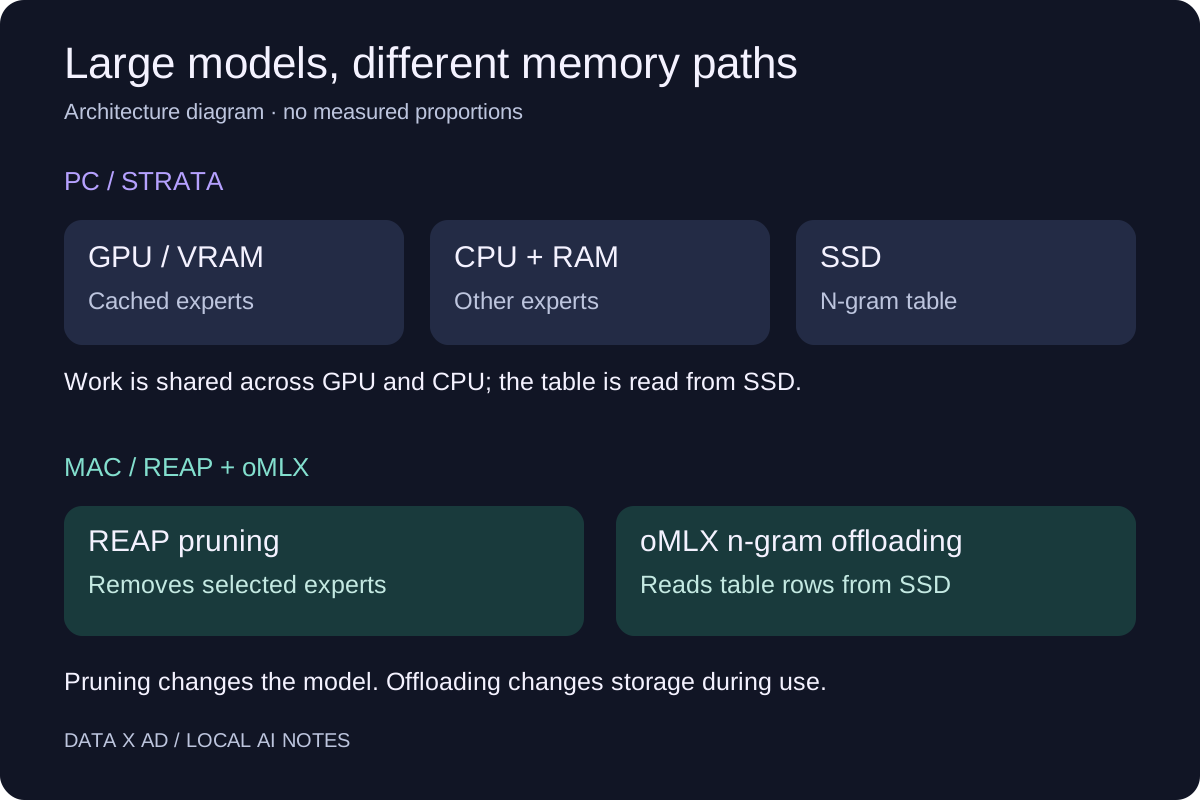
A 12 GB NVIDIA GPU can be one part of a system that runs a large local model. Other computer hardware is also important. Strata uses system RAM and the CPU to calculate, together with the GPU. On a Mac, REAP pruning and oMLX n-gram offloading decrease different parts of the memory requirement.
This guide gives each method, gives setup instructions from the sources, and lists measurements to record. Dataxad checked the sources on October 13, 2026. We did not run these models for this report. The named authors published all performance measurements.
What does Strata need on an RTX 20-series or newer GPU?
The Strata project lists NVIDIA RTX 20, 30, 40 and 50 series cards with 12 GB VRAM or more as its usual path. That is a memory condition. Some cards in these series have less than 12 GB VRAM. Check your card and its memory capacity.
The project also lists Windows 10/11 or Linux, NVIDIA driver 580 or newer, and RAM for the selected model. Its Coder variant is the smallest listed starting point, for 32 GB RAM. More RAM is necessary for the larger selections. These requirements apply to the documented model selections, not to all models on Hugging Face.
The installation guide lists 70–80 GB for the model plus about 6 GB for the MTP layer. Image files add about 1 GB. Q2_0 on an AVX-512 CPU can write an additional 40 GB copy. Keep room for these files and the software. The guide says 8 GB GPUs can run slowly; 12 GB is the usual path covered here.
The model selection guide gives these useful starting points:
| System RAM | Starting choice | Main tradeoff |
|---|---|---|
| 32 GB | Coder | Pruned for code; broader tasks need separate checks |
| 48 GB | IQ2_XS or Q2_0 | Smaller quantized weights |
| 64 GB | IQ2_XS, IQ3_XXS or IQ3_S | More choices; speed and quality differ |
Do not buy a GPU only from its series name. A useful purchase check includes VRAM, free RAM, CPU, SSD space, and the model format. If you have the computer, test it before you change hardware.
How does Strata fit a large model into limited VRAM?
Strata uses a mixture-of-experts model. A router selects a small set of expert networks for each token. Storage continues to be necessary for the full model when only some experts do work at one time.
In Strata’s architecture guide, frequently used experts stay in a GPU cache. System RAM holds the experts, and the CPU calculates the experts that the cache does not have. The GPU and CPU can work at the same time. A different n-gram lookup table stays on SSD. Each token uses only some rows.
This shows why a large parameter count does not mean that all weights must fit in VRAM. It also shows why a slow CPU or RAM that is not sufficient can limit results. The SSD is part of the system, not an alternative for all working memory.
What speed has the Strata author measured?
The published benchmark report identifies an RTX 5070 with 12 GB VRAM, a Ryzen 5 7600, and 64 GB DDR5 RAM. With engine 0.1.26, the author reports about 79 tokens/s for IQ2_XS and 53 tokens/s for IQ3_S at 4K context.
These are results for one configuration. They are not measurements of an RTX 2060 or a Mac. Prompt processing, response generation, and long-context operation are different workloads. A model can supply text quickly after a slow first response.
Record the engine version, quantization, context length, and hardware with each speed result. Compare the same prompt and output limit. A single peak number cannot show a full coding session.
What does REAP change in an MLX model?
REAP means Router-weighted Expert Activation Pruning. It uses router weights and expert activations to select experts for removal. This decreases the model size on storage. It can also change output quality. Quantization is a different change: it decreases the precision of the weights.
An MLX conversion gives a model format for Apple’s MLX framework. The word REAP does not guarantee that a runtime can run the model architecture. Check the conversion’s model card and the runtime version together.
One current example is Qwen3.8-Flash-Next-REAP-288-MLX-4bit. Its author keeps 288 of 512 experts for each MoE layer. The card reports about 68 GB on disk and about 68 GB resident with the table in memory. It reports about 39 GB resident with oMLX n-gram streaming. These are author measurements, not Dataxad tests.
How does oMLX n-gram offloading work?
The n-gram table is a large embedding lookup table. When the system reads the necessary rows from SSD, it can decrease resident memory and does not remove those rows from the model. This is different from expert pruning and from the KV cache, which keeps attention state for the current context.
The oMLX residency code checks if the checkpoint can use this path. It compares the full resident estimate with the memory ceiling. It selects SSD offloading when the full estimate is more than that ceiling and the decreased estimate fits.
Thus, a lower ceiling can select a different storage path. It does not make a model compatible if the runtime cannot run it. It also does not guarantee sufficient memory for each context length or concurrent request. Keep room for macOS, other software, and runtime state.
How can I serve the REAP model with oMLX?
The REAP model card documents oMLX v0.6.4 or newer. The v0.6.4 release notes show that oMLX works with Qwen3.8 and has PLE-related repairs. The following commands reproduce the model card’s setup example. They are source-checked instructions, not a tested installation from this report.
- Install oMLX using its documented Homebrew tap.
brew install jundot/omlx/omlx- Use an installed Hugging Face CLI to download the model.
hf download sh0wie/Qwen3.8-Flash-Next-REAP-288-MLX-4bit \
--local-dir ~/models/Qwen3.8-Flash-Next-REAP-288-MLX-4bit- Start the server with the model card’s example memory ceiling.
omlx serve --model-dir ~/models --memory-guard-gb 48The oMLX CLI source gives --memory-guard-gb as a custom ceiling in GB. The value 48 is a server setting. It is not a tested recommendation for a 48 GB Mac. Start with one request and a short prompt. Check actual memory pressure before increasing context.
Does the 39 GB mode also produce 65 tokens per second?
No oMLX result in the model card shows that claim. Its speed table gives roughly 28 tokens/s for stock mlx-vlm. The 37–65 tokens/s figures refer to a different pmlx engine. The card has no oMLX throughput benchmark.
The author also reports a single HumanEval run and tells you that calibration used coding workloads. Vision weights are in the model, but the author did not test vision quality after pruning. Use those limits when you select a model. Test your own language, tool calls, and documents.
How should I compare the two paths?
Use a small test set with tasks from your work. Include one short question, one document task, and one code change with a testable result. Use the same inputs after each configuration change.
Record these values:
- Model revision, quantization, and runtime version.
- GPU model, VRAM, system RAM, and SSD type.
- Prompt length and maximum output length.
- Time to first token and generation speed.
- Peak memory use, memory pressure, and defects.
- Correct answers and test failures.
Do each test again. Record cold-start results in a different group from requests that use a cache. Examine the outputs, not only the speed. A faster configuration must also give correct results.
For an 8 GB GPU or a small Mac, start with our 8 GB local model guide. For a team that must select between local hardware and a hosted service, contact Dataxad. We can help specify a test for your tasks before you purchase hardware.