Classic two-deck Spider Solitaire with 104 cards and ten columns
In development · Not yet on Google Play Android
MeshGames Spider Solitaire - Offline
Build the suit. Clear the tableau.
Offline Spider Solitaire for Android, with 1, 2 or 4 suits.
AndroidNot on Google Play yet iPhone and iPadApp Store: coming soon
This page does not claim a public store listing.
The short answer
What is MeshGames Spider Solitaire - Offline?
MeshGames Spider Solitaire is an offline Spider Solitaire game for Android, published by DataXad, and it is being prepared for Google Play. The game uses classic two-deck rules with 104 cards in ten columns, and you select 1, 2 or 4 suits on the home screen. Tap a face-up card to move it, with the cards on top of it, to a legal column that the game selects. You can pull a card or run to the column you select, or tap Undo to remove your last move, which costs one point. The app is free, with no ads, no in-app purchases and no account, and it does not request the Internet permission, so it works offline. Your statistics and adjustments stay on your device, and optional nearby voice and text chat works between phones in the same session.
- Developer
- DataXad
- Platform
- Android (in development)
- iPhone and iPad
- TestFlight build; App Store release coming
- Price
- Free
- Account, ads, analytics
- None
- Internet permission
- Not requested
- Package
- com.dataxad.meshgames.spider_solitaire
- Players
- You, with no opponent
- Deck
- 104 cards, two 52-card packs
- Columns
- Ten columns: 54 cards dealt, 50 in the stock
- Suits
- 1, 2 or 4 suits, with the same rules
- Win
- Remove all eight King-to-Ace runs of one suit
What is in the app
Built around the game.
1, 2 or 4 suits, from relaxed to expert
Tap a card or run to send it to a legal column that the game selects
Pull a card or run to the column you select
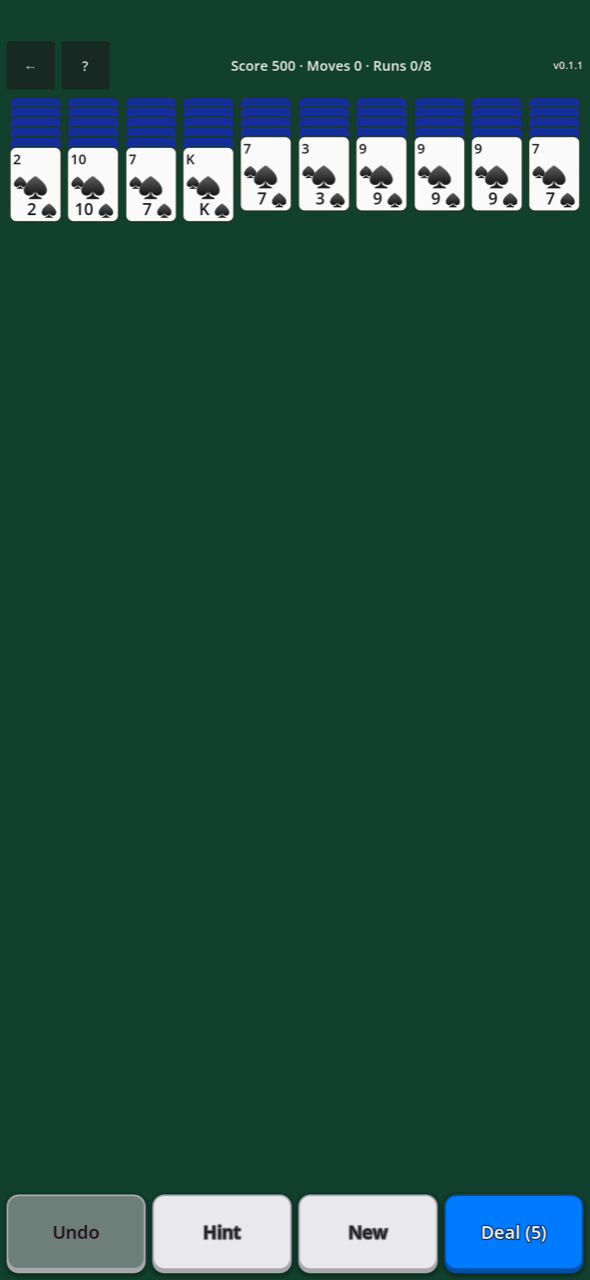
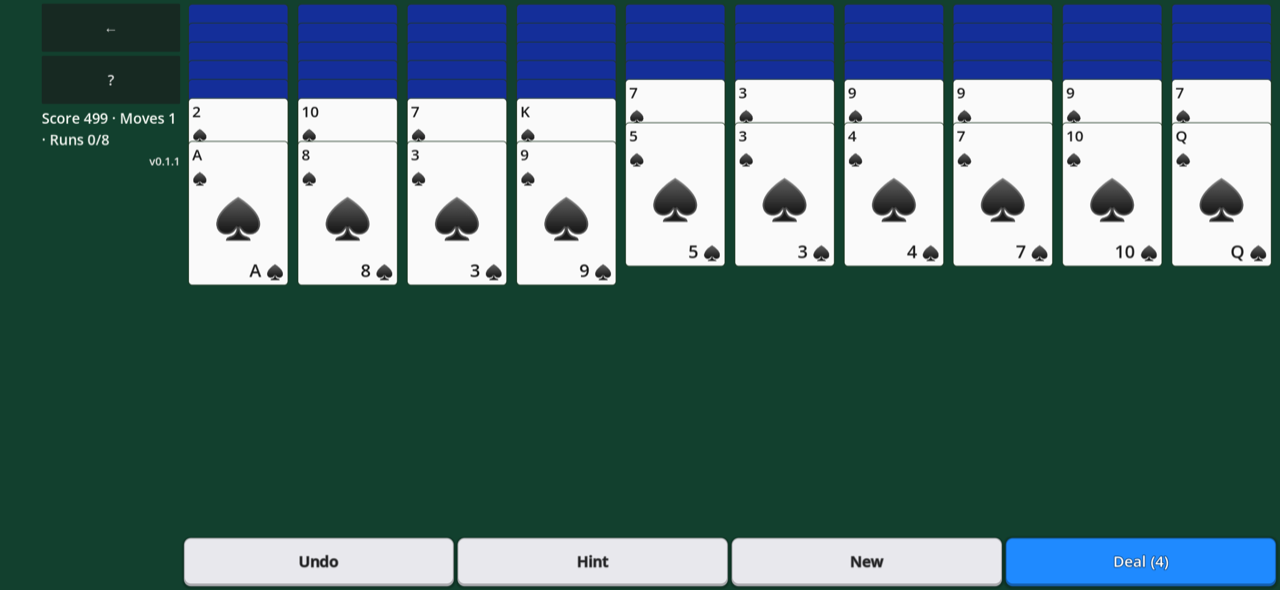
Undo, Hint, New and Deal buttons at the bottom of the screen
Score, moves and completed runs shown during play
Ten columns that fill the screen in portrait and landscape
Optional nearby voice and text chat, with no shared nearby match at this time
A quick start
How to play.
- 1
On the home screen, tap the suit level you want.
- 2
Tap a face-up card to move it, with the cards on top of it, to a legal column.
- 3
Pull a card or run onto a column to select where it goes.
- 4
Build a run from King down to Ace in one suit to clear it from the table.
- 5
Tap Deal to add one card to each column when no column is empty.
- 6
Tap Undo to remove your last move.
Nearby lobby
Conversation stays close.
Talk with friends nearby while each of you plays on your own phone. Spider Solitaire has no shared nearby match yet; the nearby option is voice and text chat only. Bluetooth is used only when you choose to host or join nearby chat.
Voice and text chat travel only over the nearby connection, are not uploaded to DataXad, and are not stored by the app. On-device mute and block controls apply only on your device; reporting opens an email draft that you decide whether to send.
Real app captures
At the table.
Questions and answers
MeshGames Spider Solitaire - Offline: common questions.
Is MeshGames Spider Solitaire free?
Yes. The app is free, with no ads, no in-app purchases and no account. No money, wagering or prizes are used. The app is in development, and it is not on Google Play at this time.
Is an internet connection necessary to play Spider Solitaire?
No. You can play offline, and the app does not request the Internet permission. Your statistics and adjustments stay on your device. Nearby chat sends information, for example your display name, only to the phones in the same session. It does not send data to DataXad or a server.
Which suit levels does Spider Solitaire offer?
You can play with 1, 2 or 4 suits. One suit is the relaxed level, two suits is the moderate level, and four suits is the expert level. All three levels use the same rules and the same 104 cards. Only the number of suits changes.
How do I move a run of cards?
Only a same-suit run, in descending sequence, can move together. Tap a face-up card in the run, and the game moves the run to a legal column that it selects. To select the column, pull the run onto it. A mixed-suit pile can be built, but you must divide it before you move it.
How does Undo work?
Undo removes your last move or deal, one step at a time. A run that the move removed comes back too. Each undo adds one to your move count and removes one point from your score. The undo history clears when you start a new deal.
How do I win a game of Spider Solitaire?
Complete all eight runs to win. A run is 13 cards, from King down to Ace in one suit. A finished run is removed from the table by itself and adds 100 points to your score. The score starts at 500 and drops by one point for each move, deal or undo.
Can all Spider Solitaire deals be won?
No. The deal is a seeded random shuffle, and the game does not check that a deal can be won. Hint suggests a move by simple rules. It does not look forward. If no move is useful and a deal is possible, Hint suggests a deal from the stock.
Can I play Spider Solitaire with a friend?
Not as one shared game. Spider Solitaire has no shared nearby match at this time. Each of you plays on your own phone. Nearby, you can use only voice and text chat, so you can speak with friends while you play. Bluetooth is used only when you host or connect to nearby chat.
Does nearby chat use my microphone or location?
The microphone is used only when you hold the push-to-talk button in nearby chat that you start. Nothing is recorded or saved, and voice is not stored or uploaded. On Android 11 and earlier, Bluetooth discovery can be grouped with a Location permission. The game does not use that permission to display, save, or share your physical location.
Does Spider Solitaire include gambling?
No. The app uses no money, no wagering, no prizes, and no simulated gambling. It has no in-app purchases and no ads. You play alone against the deal, with no computer opponent.
MeshGames Spider Solitaire - Offline is on its way.
AndroidNot on Google Play yet iPhone and iPadApp Store: coming soon
More from MeshGames
Play something similar.

Private by default
No account. No ads. No gameplay cloud.
Local settings, saves, statistics, and profile data stay on your device. The app does not request internet access and includes no advertising, analytics, or tracking SDK.